FROM RECORDING TO EDITABLE NOTES
How to convert a WAV file to MIDI
Use the converter above to turn a recording into a note estimate. WAV stores sound; MIDI stores instructions for playing notes. Your downloaded file therefore will not preserve the recorded voice, guitar tone, room sound, or effects. Choose an instrument in your music software to hear the MIDI.
- Choose one recording. Start with an isolated melody rather than a finished mix. The file picker also accepts M4A and FLAC when your browser can decode them.
- Select Convert to MIDI. Wait for the note list and piano roll. A decoding error means the recording has not reached note detection.
- Review before downloading. Check the note names, starts, and lengths. Download the .mid file, choose an instrument in your DAW, and compare it with the source.
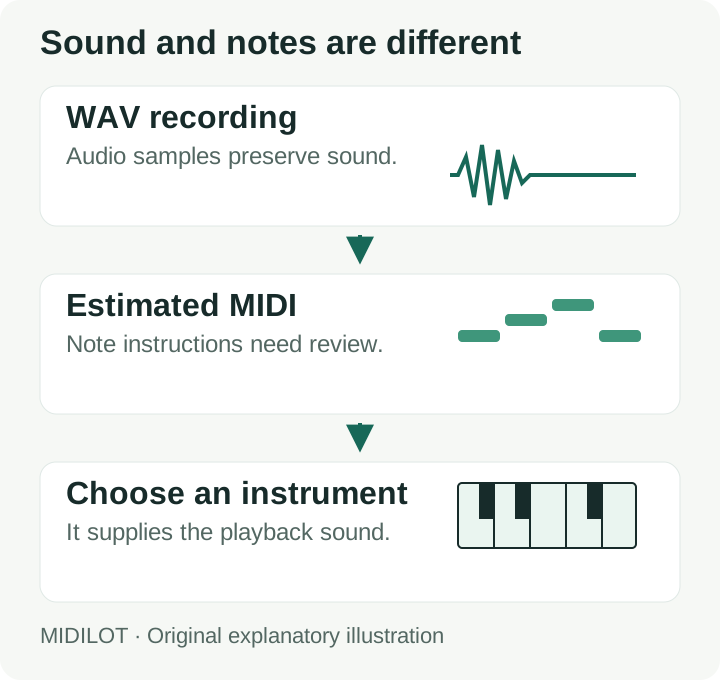
What Midilot carries into the MIDI file
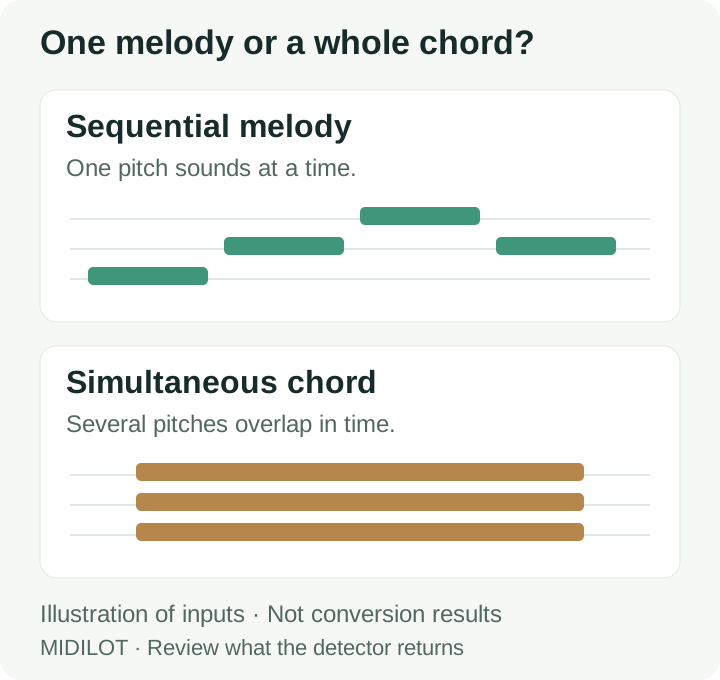
This converter estimates one pitch at a time. Stereo channels are averaged into one signal before analysis; a melody on the left and accompaniment on the right are not kept as separate tracks. Isolating a part before selecting the file is different from expecting the converter to separate it.
The export contains one MIDI track. Its tempo is set by the MIDI tempo field (120 BPM by default), and every note has velocity 88. Neither value is measured from the recording. The file uses 480 ticks per quarter note. Note starts and ends are written from detected times. The optional final release estimate can shorten a clear fade; turn it off if the fade is part of the performance. Inspect the notes before applying a DAW grid or changing the project tempo.
The detector can merge adjacent occurrences of the same pitch when their gap is shorter than 0.055 seconds. If a repeated note sounds like one longer note after conversion, compare those attacks with the recording and split the note in your editor where needed. These details come from the converter implementation, rather than an accuracy benchmark. See the matching and opposite stereo-channel check below.
Try two original WAV reference inputs
These downloadable examples contain synthesized tones with known input notes. Each is mono, 16-bit PCM at 44,100 samples per second and lasts 4.64 seconds. They provide something concrete to compare against the note list; they do not establish a song transcription accuracy rate.
One note at a time
The input sequence is C4, D4, E4, G4, A4, G4, E4, C4. Each tone lasts 0.42 seconds, followed by 0.16 seconds of silence. Compare the returned labels and note boundaries with this reference.
Download melody WAVThree notes together
The input has C4, E4, and G4 sounding together in eight blocks with the same timing. This probes a limitation: a single-pitch estimate is not a transcription of all three chord tones.
Download chord WAVFor an exact comparison, the reference file lists the programmed note times and input file hashes. Count missing notes, extra notes, and timing differences separately. A file that downloads successfully can still need substantial editing.
STEREO INPUT CHECK · 17 OCTOBER 2026
Why can an audible stereo WAV return no notes?
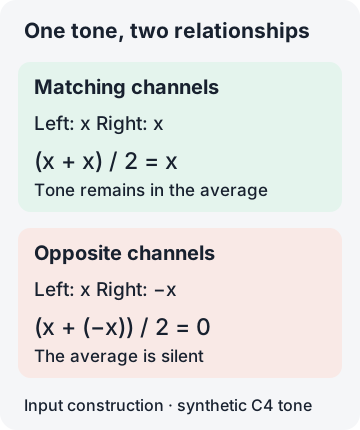
Opposite left and right samples can cancel before note detection. Midilot averages the channels into one signal. In our controlled check, matching channels produced one C4 note; reversing the right channel produced the “No clear melody notes were detected” error and no MIDI download.
We generated two one-second stereo PCM WAV files at 44,100 samples per second and 16 bits per sample. Both left channels contain the same C4-reference sine tone at 261.625565 Hz with short fades. The first right channel is an exact copy; the second is its exact negative. These are constructed tones, not recordings of a singer or instrument. Each file contains 44,100 stereo frames: duration = 44,100 / 44,100 = 1 second.
Matching channels
Chrome returned one C4 event beginning at 0 seconds. The downloaded MIDI is 56 bytes. Independent MIDI inspection gives an end time of 0.8354166666666667 seconds; the page rounds the length to 0.84 seconds. The output does not cover the entire one-second input.
Download matching-channel WAVDownload actual C4 MIDI
Opposite channels
The same converter showed: “No clear melody notes were detected. Try a clean, louder single-note recording.” The result panel stayed hidden and no MIDI download was available. We have not substituted an empty MIDI file for this failed conversion.
Download opposite-channel WAV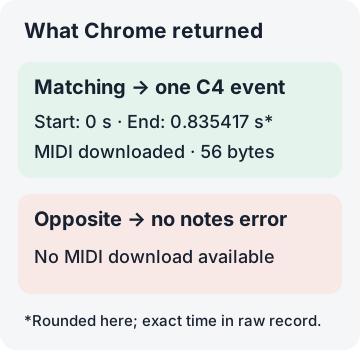
The sample check independently confirmed a maximum averaged PCM magnitude of 16,383 for the matching pair and zero for the opposite pair. This follows the implemented average: (left + right) / 2. For our opposite pair, (x + (−x)) / 2 = 0 at every sample. That calculation explains this constructed failure; it does not identify the cause of every unsuccessful WAV conversion.
To reproduce it, download either WAV, select it in the converter above, and compare the note list or error with this record. The raw stereo test record includes file hashes, the exact generation formula, the observed message, and all exported MIDI events. The successful run was parsed independently with mido 1.3.3 after a native Chrome download.
What should I check when a stereo file returns no melody?
Compare the left channel, right channel, and their mono sum in your audio editor before retrying. In our opposite-channel fixture, either individual channel contains the programmed tone, while their average is zero. Exporting one appropriate channel as a mono WAV is a separate preparation step; Midilot does not select the better channel or separate instruments for you. We have not tested that preparation on your recording.
Will making the opposite-channel file louder fix this example?
Equal gain on both channels leaves exact cancellation unchanged: (g × x + g × (−x)) / 2 = 0. Check the channel relationship before applying gain. A different recording may fail for other reasons, including an unclear melody; this pair alone does not diagnose those cases.
DURATION BOUNDARY CHECK · 18 OCTOBER 2026
Does the five-minute limit include silence?
Yes. The limit applies to the complete decoded file. In our controlled production check, a 300-second WAV completed conversion, while a 300.01-second WAV was rejected before note detection. Both contain the same one-second generated C4-reference tone followed by silence. This is a duration test, not a quality test on a five-minute song.
The inputs are mono, 16-bit PCM at 8,000 samples per second. Their durations are 2,400,000 / 8,000 = 300 seconds and 2,400,080 / 8,000 = 300.01 seconds. The only extra data in the longer file is silence: 80 / 8,000 = 0.01 seconds. A short melody inside a longer recording does not bypass the whole-file limit.
The accepted input produced a 56-byte MIDI containing one C4 note. Its note ending is recorded in the raw result; it is not a claim that the note timing is correct. The longer input produced no MIDI download. The check did not change the detector or its 300-second threshold.
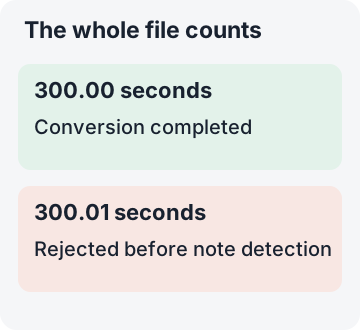
Build the exact reference files locally with the buttons below, then select either WAV in the converter above. The files have 4,800,044 and 4,800,204 bytes respectively. No long audio asset is loaded with this page; the buttons construct the test files in your browser.
Download the actual 300-second-input MIDI · Input hashes, exact construction and original results
Why did a file shown as “5.0 minutes” fail the limit?
The earlier message rounded the file duration to one decimal minute, so 300.01 seconds appeared as “5.0 minutes.” The limit check still correctly rejected it. We changed the message to state that the file exceeds 300 seconds, including silence, without displaying that misleading rounded value. Trim the recording before selecting it again.
SHORT INPUT CHECK · 19 OCTOBER 2026
Why can a very short WAV return no MIDI?
Passing the file-duration check does not guarantee a detected note. In our live Chrome check, a 0.249-second WAV stopped with the too-short message. A 0.250-second version reached note detection but returned no clear melody. A 0.500-second control made with the same tone formula produced one C4 note and an actual 56-byte MIDI download.
We constructed mono, 16-bit PCM tones at 8,000 samples per second, using the same 261.625565 Hz reference frequency and fade formula. The file durations are 1,992 / 8,000 = 0.249 seconds, 2,000 / 8,000 = 0.250 seconds, and 4,000 / 8,000 = 0.500 seconds. These are synthetic inputs, not short recordings of a singer or instrument.
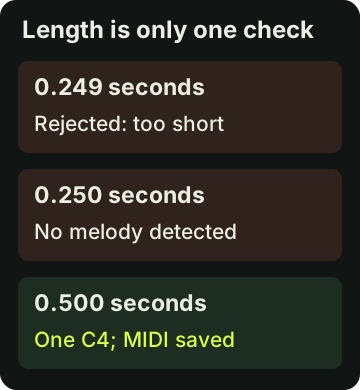
Two separate checks explain the different errors
The implementation rejects decoded files shorter than 0.25 seconds before detecting notes. At the time of the 19 October test it used 2,048-sample windows, a 256-sample hop and an 11,025 Hz analysis rate. For the 0.250-second input, the derived sample count is floor(0.25 × 11,025) = 2,756, giving floor((2,756 − 2,048) / 256) + 1 = 3 complete windows. A retained note requires at least 4 consecutive frames. This is the historical calculation; the current detector uses 1,024-sample windows, so a new conversion can differ. The visible historical result is recorded separately below.
The longer control's downloaded MIDI contains C4 from 0 to 0.325 seconds, independently parsed after a native Chrome download. Its note ending differs from the input ending by 0.325 − 0.500 = −0.175 seconds. The file is readable MIDI, but this result does not preserve the entire generated tone. Reaching the minimum input length is therefore separate from recovering the intended note timing.
Try the three exact inputs in the converter above and compare the error or note list with this record.
Exact construction, input hashes, observed errors and full MIDI events
Should I check note timing even when a short clip converts?
Yes. Our 0.500-second control returned one C4 note, but its exported end was 0.325 seconds. Compare the start, end and pitch with the recording before using the MIDI. This one constructed case does not set a reliable minimum clip length for every recording.
INPUT LEVEL CHECK · 20 OCTOBER 2026
Can a quiet WAV contain the right pitch but return no MIDI?
Yes: our low-level synthetic tone returned no notes, while multiplying its existing samples by 2,500 produced one C4. A separately generated reference-level version also produced C4. The two successful native MIDI downloads were byte-identical. This is one controlled level check, not a gain recommendation or an accuracy score for real recordings.
All three WAVs contain 16,000 mono PCM samples at 8,000 samples per second: 16,000 / 8,000 = 2 seconds. The original reference and quiet versions use the same 261.625565 Hz sine and fade formula, with amplitude parameters 0.5 and 0.0002, quantized separately to signed 16-bit PCM. Their measured absolute PCM peaks are 16,383 and 7. The exact reconstruction script and input hashes are provided below.
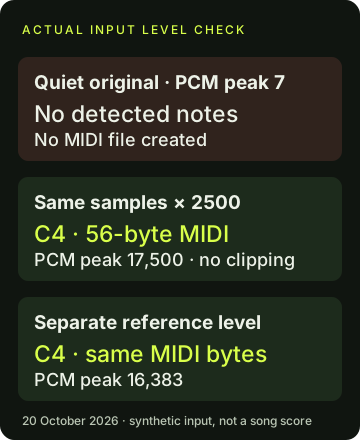
What changed when we raised the existing quiet samples?
We multiplied every already-quantized sample in the quiet WAV by exactly 2,500. Its new absolute peak was 7 × 2,500 = 17,500, still below the signed PCM16 positive limit of 32,767, so this operation needed no clipping. The multiplier was selected for this diagnostic and equals the generator-parameter ratio 0.5 / 0.0002. The boosted WAV is not byte-identical to the independently quantized reference WAV; raising gain does not undo the original rounding.
In the live Chrome sequence, the reference-level input first produced one C4 and a 56-byte MIDI file. Selecting the quiet WAV cleared that old result, and converting it displayed the no-clear-melody message. The result stayed hidden, with an empty note list and no download URL. The boosted quiet WAV then produced C4 and a new 56-byte MIDI download. Independent parsing found the same format-0, one-track, 480-PPQ events in both successful files.
Both exported notes start at 0 and end at approximately 1.834375 seconds. Compared with the two-second constructed input, the end difference is 1.834375 − 2.000000 = −0.165625 seconds. That equality of output files does not establish full timing recovery. The JSON retains the exact parser values, including floating-point precision; the displayed end is rounded to six decimals.
What the implementation checks
The current detector source applies a frame-level gate of max(0.0004, peakRms × 0.08) before estimating pitch in eligible frames. This source reading shows why having a pitched waveform is not the only requirement for detection. We did not capture the browser’s intermediate frame RMS values, so the gate expression is an implementation explanation rather than an additional internal measurement.
- Reference-level input WAV
- Original low-level input WAV
- That low-level input with samples multiplied by 2,500
- Actual reference-level MIDI
- Actual boosted-input MIDI
Read formulas, hashes, UI errors and full MIDI events · Rebuild the three exact WAVs
Will raising gain fix every no-melody error?
Raising the existing samples helped this quiet synthetic input, but it did not preserve the full note ending or restore information lost during quantization. Check the new result against the source. Our opposite-channel example is a different failure: equal gain on both opposite channels still cancels in their mono average.
FILE-RELATIVE TIMING CHECK · 21 OCTOBER 2026
Does moving silence preserve the note’s start time?
It did not preserve the programmed shift in our controlled pair. Moving the same two-second tone later by 0.5 seconds moved the exported C4 start by approximately 0.302083 seconds. Both files converted and downloaded as readable MIDI, but the second note started before its programmed tone window. Matching the pitch name did not establish correct alignment.
We placed the exact same 16,000 already-quantized tone samples into two 20,000-frame mono PCM16 WAV files at 8,000 samples per second. Each complete file lasts 20,000 / 8,000 = 2.5 seconds. The control places the tone in the programmed 0–2 second window and adds 0.5 seconds of zero samples after it. The other places 4,000 zero samples first: its programmed tone window is 0.5–2.5 seconds. The displacement is 4,000 / 8,000 = 0.5 seconds; neither tone was stretched or regenerated at another pitch.
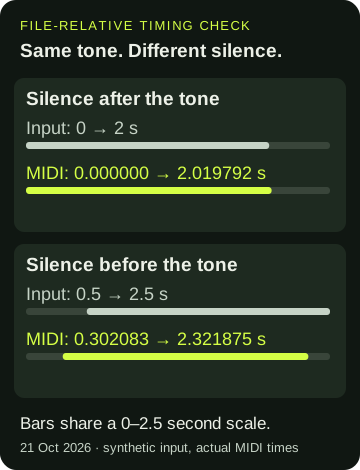
What the two downloaded MIDI files contain
The control produced a 56-byte format-0 MIDI; the leading-silence input produced 57 bytes. Independent mido parsing found one C4 event in each, one track and 480 ticks per quarter note. The control event starts at 0 and ends at approximately 2.019792 seconds. The leading-silence event starts at approximately 0.302083 and ends at 2.321875 seconds. Selecting the second WAV cleared the first result before the second conversion, so these are separate input/output runs.
Relative to the leading input’s programmed window, the start difference is 0.302083 − 0.500000 ≈ −0.197917 seconds; the end difference is 2.321875 − 2.500000 = −0.178125 seconds. For the control, the end difference is 2.019792 − 2.000000 ≈ +0.019792 seconds. The displayed times are rounded to six decimals; the JSON retains exact parser values, all events and every calculation input. These comparisons use the programmed tone windows, including fades. They are not measurements of a performer’s attack.
The same tone bytes therefore did not guarantee that its exported start would move by the full inserted silence. We have not isolated decoding, detection and event export as separate causes, and we did not capture internal analysis frames. This pair is evidence to inspect source alignment before editing; it is not a universal timing correction, a DAW latency measurement or a song-accuracy rate.
- Control WAV: tone, then silence
- Shifted WAV: silence, then the same tone
- Actual control MIDI
- Actual leading-silence MIDI
Exact construction, input hashes, MIDI events and differences · Rebuild both exact WAVs
Should I quantize the notes as soon as the MIDI downloads?
First compare the unedited note starts and endings with the source at the same file origin. A valid MIDI file and the correct note name do not establish that alignment. Snapping an early note to a grid does not tell you where the original tone began; our two inputs and actual exports let you inspect that distinction before changing the events.
What the reference files returned in Chrome
On 14 October 2026, we selected each reference WAV in the live converter above. The melody returned C4, D4, E4, G4, A4, G4, E4, C4 in that order. The labels matched the programmed sequence, but the timing did not match throughout. The table compares the known input with the values displayed in the note list; these are rounded display values, not exact MIDI timestamps.
| Note | Input start | MIDI start | MIDI length |
|---|---|---|---|
| C4 | 0.00 s | 0.00 s | 0.42 s |
| D4 | 0.58 s | 0.42 s | 0.58 s |
| E4 | 1.16 s | 1.00 s | 0.58 s |
| G4 | 1.74 s | 1.58 s | 0.58 s |
| A4 | 2.32 s | 2.16 s | 0.58 s |
| G4 | 2.90 s | 2.74 s | 0.58 s |
| E4 | 3.48 s | 3.32 s | 0.58 s |
| C4 | 4.06 s | 3.90 s | 0.56 s |
Each input tone lasted 0.42 seconds. For example, D4 began at 0.58 seconds in the input but at 0.42 seconds in the displayed result: returned start minus input start = 0.42 − 0.58 = −0.16 seconds. Matching a note name does not establish a correct attack or release.
The chord file returned one C2 note starting at 0.00 seconds and lasting 4.46 seconds. Its input contained C4, E4, and G4 together in eight separate blocks. The output therefore did not reproduce the chord pitches or the separate blocks. This is a concrete reason to avoid using this single-melody converter for a chord transcription.
Download the inputs above and compare your own result. The observed note-list record preserves both runs. These two synthetic inputs describe this test only; they do not measure accuracy on voices, instruments, or songs.
M4A to MIDI and FLAC to MIDI
Use the same file picker for both formats. Acceptance of the filename does not guarantee that the browser can decode the audio inside it. Midilot uses the browser's decodeAudioData method, which reads a complete audio file before note detection.
If decoding fails, export a complete PCM WAV from an audio editor and try that copy. Renaming .m4a or .flac to .wav does not change the encoding. Changing the container also does not isolate a melody, remove accompaniment, or recover notes already obscured in the recording.
When a conversion stops or looks wrong
| What you see | What to check |
|---|---|
| A duration-limit message | The limit is 5 minutes for the decoded file. Export a shorter excerpt; converting the format alone does not shorten it. |
| No clear melody notes detected | The detector returned no notes. Try an isolated pitched part and check that the recording is audible. A drum-only part is not a pitched melody. |
| Fewer rows than the note count | The list shows the first 100 notes when the total is larger. This display limit does not remove later notes from the download. |
| A valid MIDI message, but the melody sounds wrong | The structural check verifies the file header and track length. It does not compare the detected pitches with a reference score. |
Questions before you convert WAV into MIDI
Which website or app do I need for audio to MIDI?
You can try Midilot directly in your browser using the converter at the top of this page. No account or separate conversion app is required. It estimates a single melody locally; use a DAW or MIDI editor afterward to choose an instrument and correct notes.
Does converting WAV into MIDI keep the original sound?
No. The result contains estimated note events. The selected MIDI instrument supplies the sound, so the timbre can differ even when a note pitch matches.
Can I convert a full song into separate MIDI instruments?
Midilot does not separate a song into instruments. A layered recording may produce incomplete or incorrect notes. Work with an isolated part if you need a melody estimate; do not treat this tool as a full arrangement transcriber.
Can I turn the result into sheet music?
Yes, a notation program can read the downloaded MIDI. Review the notes first, then follow the audio to sheet music guide. Notation displays the notes present in the MIDI; it cannot restore notes that were missed.
Does the file format change the result?
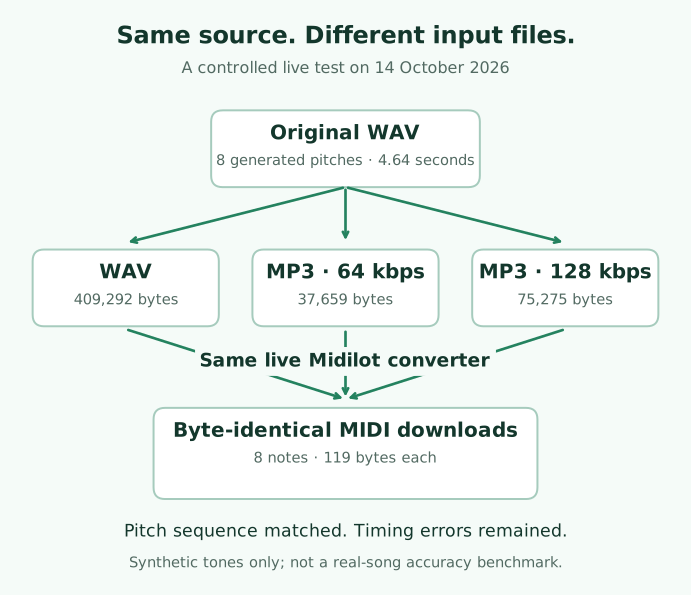
Our same-source check used this original melody WAV and two MP3 encodings. All three downloaded MIDI files were identical in that run, including their timing errors. This synthetic input does not establish the result for real songs.
Watch the conversion workflow
Watch the original explanation of audio, MIDI and the reference checks. The video explains the local workflow and its limits; the downloadable reference inputs above let you check the notes yourself.
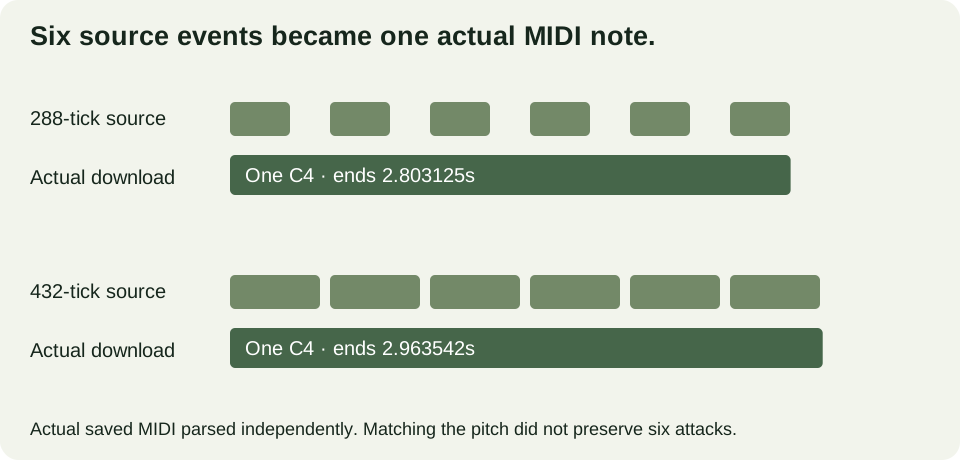
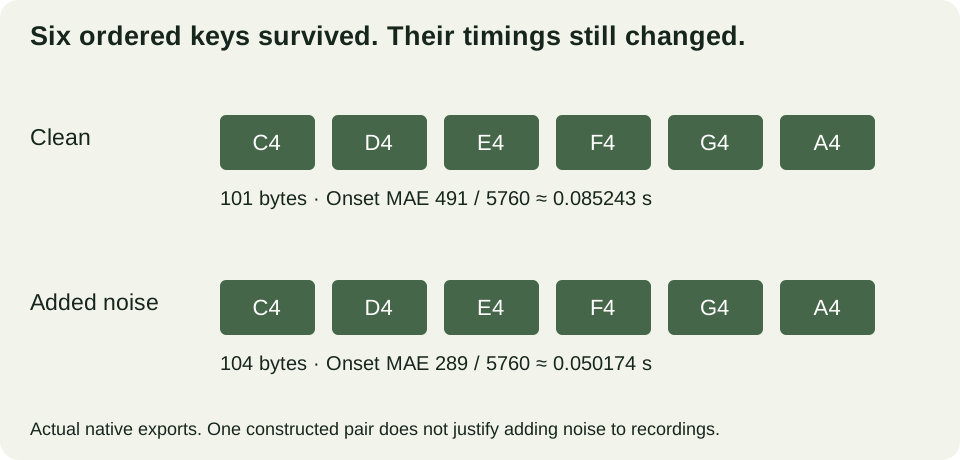
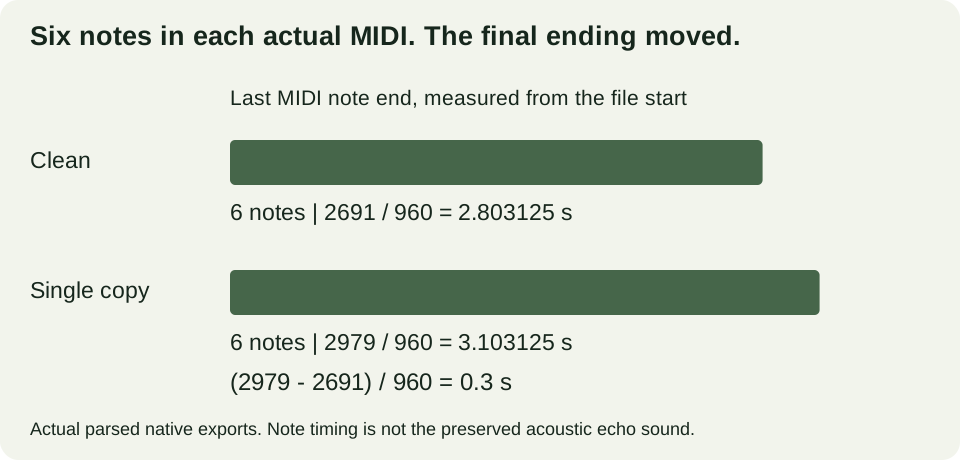
Inspect the original echo controls and actual MIDI.
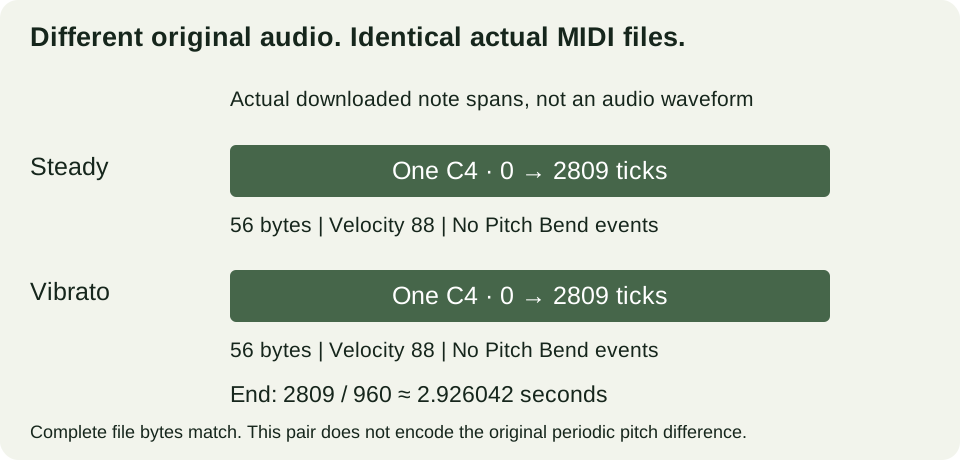
Hear the original vibrato controls and inspect their actual MIDI.